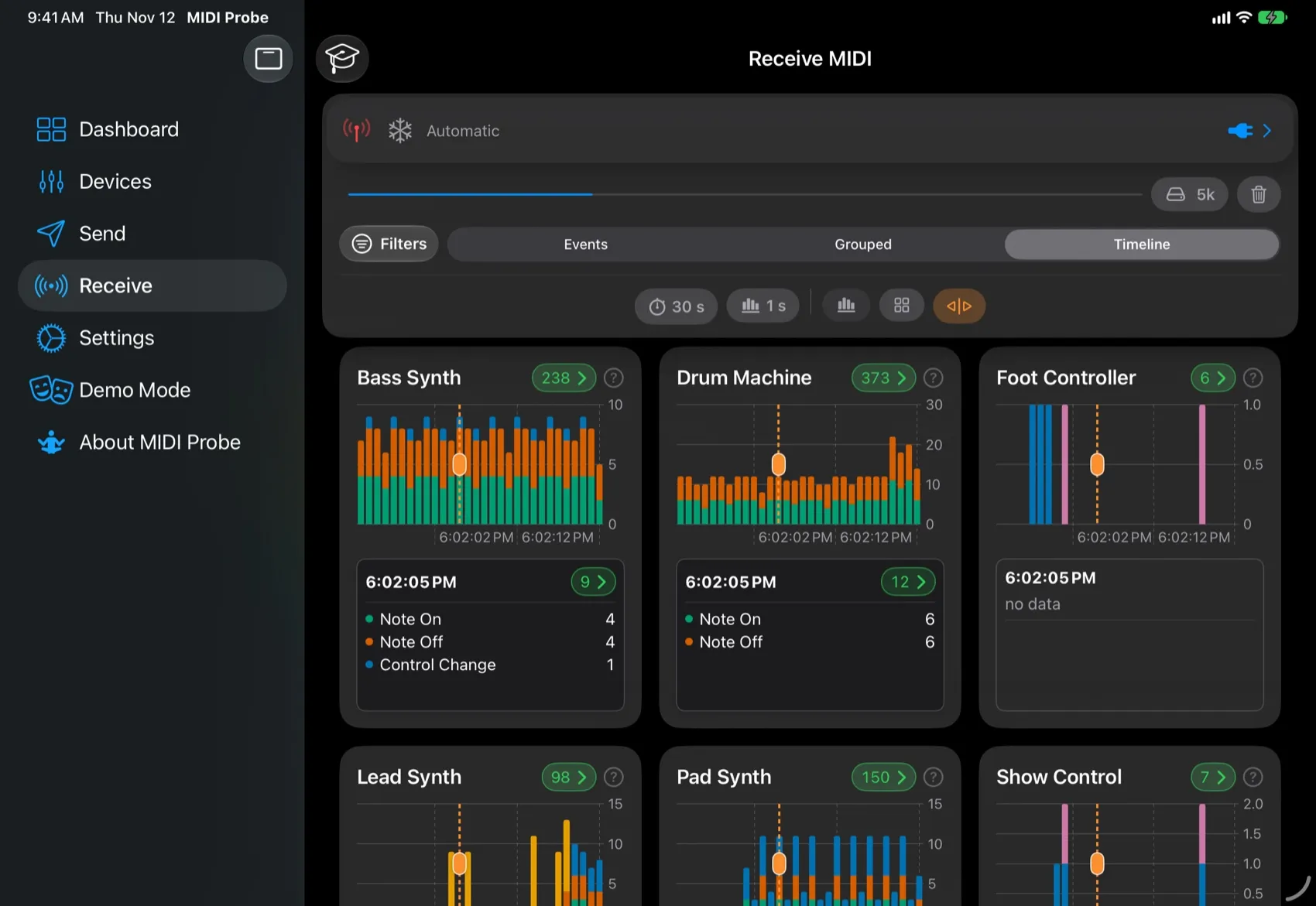
Most of the effort in this release went into analysing multiple devices that send in parallel. But we made lots of small improvements for regular traffic and analysis too!
Main Achievements
Receiving redesigned
- Three ways now to view incoming MIDI:
- Raw — a live list of events, with optional time-slot separators. Useful for analysing a few devices or lower traffic.
- Improved Grouped view — see activity by device, event type and now also by channel, and drill down into what one device did.
- Brand-new Timeline / Charts view* — activity over time for each device: see who sent what and when, and relate the devices’ messages to each other. A movable time marker picks a time slot and shows its events: tap the chart to place it, drag its handle to move it and see what each device sent in that time slot.
- Brand-new detail pages for events, groups and channels. Filter and group the detail data on the fly, by event type or by channel.
- Filters are set in one place and apply in every view. You can also edit them from the detail pages.
- Mute and Freeze at the top work in every view: Mute pauses recording, Freeze holds the display still while new messages are still stored.
Much faster
- Much smoother with heavy MIDI traffic. The event lists are much faster, and scrolling stays as smooth as possible while events arrive.
- The app automatically optimizes values for live views and tells you when it lowers one to keep things responsive.
Guided tours and in-place help
- Step-by-step tours for the Dashboard, Send (iPhone and iPad), Receive, and the Grouped, Timeline and Detail views.
- ”?” help buttons on the cards explain each part where you use it.
Demo mode: try MIDIProbe without hardware
- Simulated MIDI devices send what real instruments and controllers send, so you can explore every screen before connecting anything.
- Scenarios and load: choose a scenario, from a few controllers to a full orchestra or a song, and how much the devices send.
- Start it from the Dashboard or the new Demo Mode tab. Your own devices and their selection stay as they are, and the next launch is always on your real devices.
Other Changes
- Pick devices right where you use them: choose sources and destinations directly on the Send and Receive screens. You no longer have to go to Devices first. On Receive, Automatic shows messages from every device, regardless of the selection.
- Dashboard: a new status view with a live activity chart and buffer controls built in.
- Adjustable buffer size in Settings and on the Dashboard, with a higher default.
- iPad and Mac: layouts adapt to the device, with larger text on iPad, better-sized headers and content widths, and improvements for Mac (“Designed for iPad”).
Fixes
- Fixed a crash on the Bluetooth MIDI pairing screen on iOS 27.
* Part of the Analyzer Pro package. It will become an in-app purchase later, but you get it for free now!